
أقوى 15 برومبت جاهز للصور في جوجل جيميناي
هل ترغب في إنشاء صور احترافية باستخدام الذكاء الاصطناعي دون إضاعة الوقت في التجربة؟ مع جوجل جيميناي، يمكنك ذلك بسهولة عبر استخدام برومبت جاهز للصور يمنحك نتائج مذهلة في ثوانٍ.
في هذا المقال، ستجد 15 برومبت جاهز لإنشاء الصور حيث يمكن تحويل أفكارك إلى تصاميم مبهرة بسرعة ودقة. سواء كنت مصممًا أو صانع محتوى أو مسوّقًا، ستكتشف كيف يمكن للكلمات أن تصنع فناً بصريًا متكاملاً.
جدول المحتويات
ما هو نموذج جيميناي؟
نموذج Gemini AI هو نظام ذكاء اصطناعي متطور من جوجل، صُمم ليكون متعدد الوسائط، أي قادر على فهم النصوص والصور والفيديو والصوت والرموز ودمجها بسلاسة. يتميز بقدرته على إنشاء محتوى مرئي مذهل باستخدام برومبت جاهز للصور، مما يجعله أداة مثالية للمصممين والمبدعين.
يتوفر جيميناي بإصدارات مجانية ومدفوعة، حيث تتيح النسخة المجانية وظائف أساسية، بينما توفر الخطط المدفوعة مثل Google AI Pro وUltra أداءً أقوى وتحليلاً أعمق. يُستخدم جيميناي في مجالات متنوعة مثل التعليم، إنشاء المحتوى، البحث، وتوليد الصور والفيديو، كما يمكن دمجه مع تطبيقات جوجل مثل Gmail و Docs لتعزيز الإنتاجية. ويعد إصدار Gemini 2.5 Pro الأحدث والأكثر تقدمًا بفضل ميزة “التفكير” التي تمكّنه من تحليل الأفكار قبل توليد الردود، ما يمنحه دقة وسرعة استثنائية في الأداء.
أوامر نصية جاهزة لإنشاء الصور في جيميناي
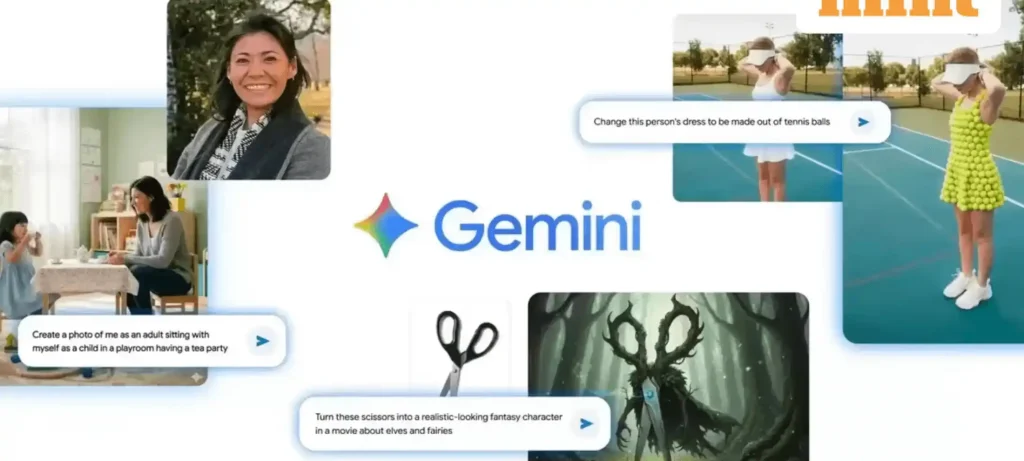
إذا كنت ترغب في إنشاء صور احترافية بسرعة، يمكنك الاستفادة من برومبت جاهز للصور في جيميناي. فيما يلي مجموعة من الأوامر النصية التي تساعدك على توليد صور مذهلة بسهولة وبدقة عالية:
1- تبديل الخلفية
استبدل الخلفية بمشهد جديد مثل شاطئ عند الغروب أو حديقة جميلة، مع الحفاظ على الشخص أو العنصر الرئيسي كما هو في الصورة الأصلية. تأكد أن الألوان والإضاءة والظلال تبدو طبيعية، وأن العنصر يندمج بسلاسة في المشهد الجديد بشكل واقعي وواضح.
Replace the current background with a [describe new scene: e.g., serene sunset beach with gentle waves, warm golden light], while keeping the [subject: e.g., woman in a red dress] exactly as photographed. Maintain the original subject’s pose, clothing details, lighting, and sharpness. Ensure natural color matching, realistic shadows, and seamless edges so the subject blends smoothly into the new environment. Use high-resolution output and preserve a photo-realistic style.
2- إضافة عنصر
أضف [العنصر الذي تريده] بحيث يبدو طبيعيًا داخل الصورة. اجعل الإضاءة والظلال والألوان متناسقة مع الصورة الأصلية، واحرص على أن يندمج العنصر الجديد بسلاسة ليبدو واقعيًا وعالي الدقة.
Add a [describe the object you want added, so that it looks naturally part of the scene. Match the lighting direction, shadows, perspective, and color temperature of the original photo. Preserve all existing subjects and details without distortion. Ensure the added object has realistic texture, seamless edges, and accurate reflections to create a high-resolution, photorealistic result.
3- إزالة عنصر
أزل [وصف العنصر المراد إزالته] تمامًا. املأ المنطقة الفارغة بعناصر من الخلفية الطبيعية تتناسب مع المشهد من حيث الإضاءة، الظلال، الألوان، والقوام، بحيث يكون التعديل سلسًا وغير مرئي. احرص على الحفاظ على بقية المشهد والعناصر بجودة عالية وواقعية فائقة.
Remove the [describe the object to be removed—e.g., trash can on the left side, distracting sign behind the subject] completely. Fill the empty area with natural background elements that match the surroundings—including consistent lighting, shadows, colors, and textures—so the edit is seamless and invisible. Preserve the rest of the scene and subjects in high-resolution photorealistic quality.
4- تغيير منظور الكاميرا
غيّر منظور الكاميرا إلى [مثل منظور علوي / خلفي / جانبي / لقطة قريبة] مع الحفاظ على جميع العناصر والأشخاص في الصورة كما هي. عدّل الزاوية والعمق والتكوين لتبدو الصورة طبيعية من المنظور الجديد، مع الحفاظ على الإضاءة والظلال والألوان والملمس بشكل متناسق وواقعي. تأكد أن تكون النتيجة عالية الدقة ومليئة بالتفاصيل مع الحفاظ على جودة الصورة الأصلية.
Change the camera perspective to [e.g., Bird’s-eye view / Rear view / Side profile view / Close-up portrait view] while keeping all existing subjects and objects intact. Adjust the angle, depth, and composition so the scene looks natural from this new perspective. Maintain consistent lighting, shadows, colors, and textures for a seamless and photorealistic result. Ensure the final image is high-resolution and detailed, preserving the original photo’s quality while reflecting the chosen perspective.
5- ترميم صور قديمة بالذكاء الاصطناعي
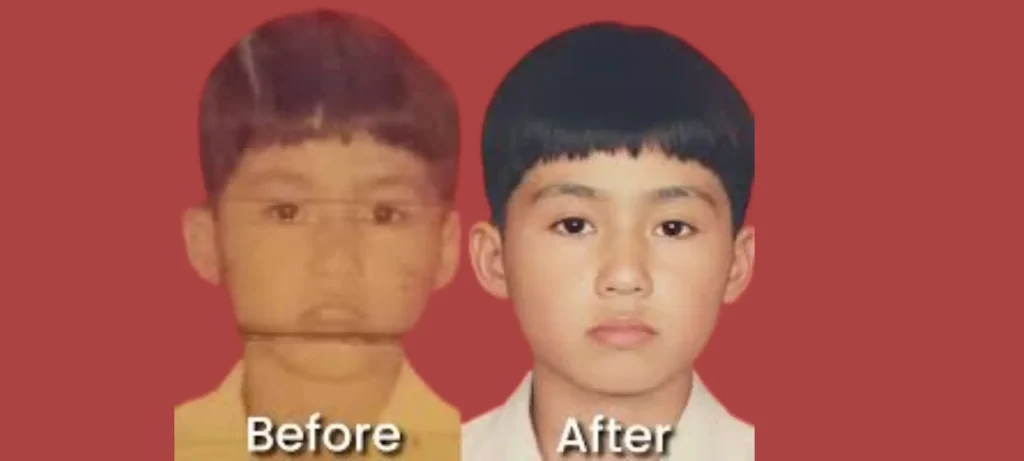
برومبت جاهز للصور القديمة: قم بترميم هذه الصورة القديمة أو التالفة عن طريق إزالة الخدوش والغبار والبقع والتمزقات والضوضاء، مع إصلاح الألوان الباهتة وتعزيز التباين. احرص على الحفاظ بدقة على جميع الأشخاص وملامح الوجه والتفاصيل الأصلية. حافظ على مظهر طبيعي وواقعي مع إضاءة متوازنة وملمس وظلال متناسقة.
Restore this old or damaged photo by removing scratches, dust, stains, tears, and noise, while repairing faded colors and enhancing contrast. Preserve all original subjects, facial features, and details accurately. Maintain a natural, realistic appearance with balanced lighting, textures, and shadows. Output the final image in high-resolution, photorealistic quality, making it look as if it was freshly captured without altering the original scene.
6- تحرير النص في الصورة
حرّر النص الموجود في الصورة عن طريق استبداله أو إضافة نص جديد [حدد النص الجديد مثل: “عيد ميلاد سعيد”] في المكان المطلوب بالضبط. احرص على الحفاظ على نمط الخط وحجمه ولونه ومحاذاته كما هو، بحيث يظهر بشكل طبيعي ومتناسق. تأكد من أن الخلفية المحيطة والظلال والملمس تبقى سلسة وغير مشوهة.
Edit the text in the image by replacing or adding [specify new text e.g., ‘Happy Birthday’] exactly where needed. Maintain the original font style, size, color, and alignment so it looks natural and consistent. Ensure the surrounding background, shadows, and textures remain seamless and undistorted. Photorealistic, seamless integration.
7- استخراج العناصر
استخرج [حدد العنصر مثل شخص، سيارة] من الخلفية مع الحفاظ على جميع التفاصيل والحواف والملمس كما هو. قم بإزالة الخلفية بالكامل أو اجعلها شفافة مع الحفاظ على ألوان العنصر الأصلي والإضاءة والظلال. تأكد أن العنصر المستخرج بدقة عالية، ومنفصل لتسهيل استخدامه في تركيبات أو تصاميم أخرى.
Extract the [specify object e.g., person, car, or animal] from the background, keeping all details, edges, and textures intact. Remove the background completely or make it transparent while maintaining the original subject’s colors, lighting, and shadows. Ensure the extracted object is high-resolution, sharp, and cleanly separated for easy use in other compositions or designs.
8- تحسين جودة الصورة
حسّن الصورة عن طريق زيادة وضوح التفاصيل، تحسين الألوان والحدة، ضبط الإضاءة والتباين، إزالة التشويش، مع الحفاظ على جودة الصورة الأصلية بشكل طبيعي وواقعي فوتوغرافيًا.
Enhance the image by sharpening details, improving colors and clarity, adjusting lighting and contrast, removing noise, and keeping the original composition natural and photorealistic.
9- تغيير لون الصورة
غيّر لون [حدد العنصر أو الجسم—مثل السيارة، الفستان، السماء] إلى [اللون المطلوب—مثل الأحمر الفاقع، الأزرق الباستيلي] مع الحفاظ على جميع التفاصيل، الإضاءة، والظلال كما هي. تأكد من اندماج اللون الجديد بشكل طبيعي مع البيئة المحيطة مع الحفاظ على مظهر واقعي فوتوغرافي. احتفظ ببقية عناصر الصورة كما هي، بما في ذلك جميع الموضوعات الأخرى وخلفية الصورة والتكوين العام.
Change the color of [specify object or element—e.g., the car, the dress, the sky] to [desired color—e.g., bright red, pastel blue] while keeping all textures, lighting, and shadows intact. Ensure the new color blends naturally with the surrounding environment and maintains a realistic, photorealistic appearance. Preserve the rest of the image exactly as it is, including all other subjects, background details, and overall composition.
10- استبدال عناصر الصورة
استبدل [حدد العنصر—مثل سيارة قديمة، مصباح، شجرة] بـ [العنصر الجديد مثل سيارة رياضية حديثة، مصباح قديم الطراز، شجرة أزهار الكرز] مع الحفاظ على المشهد الأصلي، والموضوعات، والخلفية دون تغيير. تأكد أن العنصر الجديد يتوافق مع الإضاءة، والزوايا، والظلال، والألوان في المشهد. النتيجة يجب أن تكون واقعية، عالية الدقة، وطبيعية تمامًا.
Replace the [specify element e.g., old car, lamp, tree] with a [new element—e.g., modern sports car, vintage lamp, cherry blossom tree] while keeping the original scene, subjects, and background intact and unchanged. Ensure the new element matches the lighting, perspective, shadows, and colors of the scene. Photorealistic, high-resolution, natural, and authentic.
11- تغيير الإضاءة والظل
قم بضبط الإضاءة والظلال في المشهد لتحقيق [حدد التأثير المرغوب مثل ضوء الشمس في ساعة الغروب، إضاءة منخفضة درامية، إضاءة ناعمة منتشره] مع الحفاظ على جميع العناصر والموضوعات والخلفية كما هي
Adjust the lighting and shadows in the scene to achieve [specify desired effect e.g., golden hour sunlight, dramatic low-light, soft diffused lighting] while keeping all subjects and background details intact. Ensure the changes maintain realistic highlights, reflections, and depth, enhancing the overall mood without distorting the original elements. Photorealistic, high-resolution, natural, and authentic.
12- تغيير حجم الصورة
برومبت جاهز للصور ذات الحجم غير المناسب: قم بتمديد حواف الصورة لإنشاء مشهد أكبر مع الحفاظ على النمط الأصلي، المنظور، الألوان، الإضاءة، والقوام. أضف عناصر خلفية أو بيئية طبيعية ومنسجمة تتوافق مع الصورة الأصلية.
Extend the edges of the image to create a larger scene while maintaining the original style, perspective, colors, lighting, and textures. Add natural and seamless background or environmental elements that match the existing photo. Photorealistic, high-resolution, natural, and authentic.
13- تغيير تعبيرات الوجه
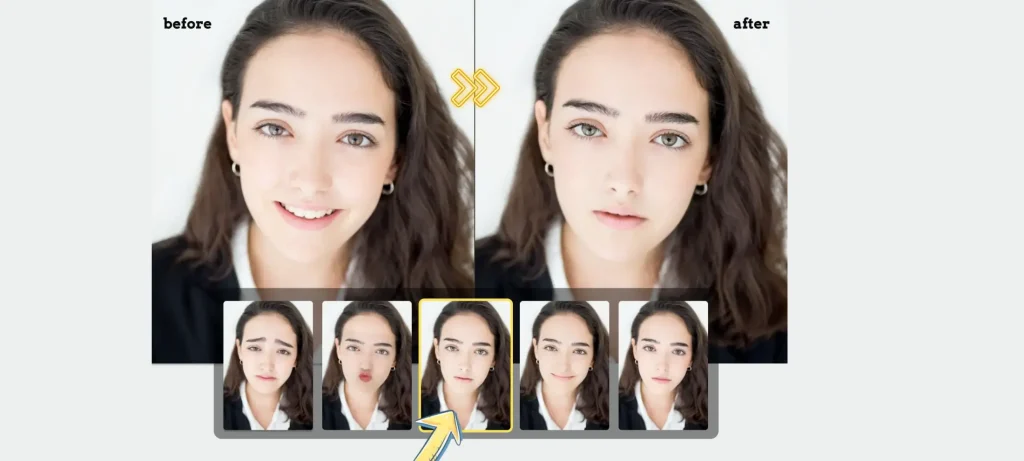
غيّر تعبير وجه العنصر إلى [حدد التعبير المطلوب مثل: مبتسم، مندهش، جاد، ضاحك] مع الحفاظ على جميع ملامح الوجه، الشعر، نسب الجسم، والخلفية كما هي. تأكد أن يكون التعبير الجديد طبيعيًا وواقعيًا
Change the subject’s facial expression to [specify desired expression e.g., smiling, surprised, serious, laughing] while keeping all facial features, hair, body proportions, and background intact. Ensure the new expression looks natural and photorealistic, maintaining realistic skin texture, lighting, shadows, and proportions. High-resolution, authentic, seamless result.
14- ضبط الإيماءات
عدّل إيماءات العنصر أو وضعية اليدين إلى [حدد التغيير المطلوب مثل: رفع اليد اليمنى، الإشارة بالسبابة اليسرى، طي الذراعين] مع الحفاظ على بقية الجسم، تعبير الوجه، والخلفية كما هي.
Adjust the subject’s gestures or hand positions to [specify desired change e.g., raise right hand, point left finger, fold arms] while keeping the rest of the body, facial expression, and background intact. Ensure the new gesture looks natural and photorealistic, maintaining realistic anatomy, lighting, shadows, and proportions. High-resolution, seamless result.
15- تجربة الملابس الافتراضية
قم بتغيير ملابس العنصر [حدد الملابس مثل: فستان سهرة أحمر، جينز أزرق وقميص، جاكيت جلد] مع الحفاظ على وضعية الجسم، تعبير الوجه، والخلفية كما هي.
Dress the subject in [specify clothing e.g., red evening gown, casual blue jeans and t-shirt, leather jacket] while keeping the body posture, facial expression, and background intact. Ensure the clothes fit naturally, with realistic folds, shadows, textures, and lighting that match the original photo. Produce a high-resolution, photorealistic result where the clothing blends seamlessly with the subject and the scene, preserving overall authenticity.
الخلاصة
باستخدام برومبت جاهز للصور في جوجل جيميناي، يمكنك صناعة وتعديل الصور بطريقة مذهلة بسهولة ودقة عالية. توفر هذه الأوامر النصية المرنة إمكانيات لا محدودة لتخصيص المشاهد، تعديل الإضاءة، وتحسين التفاصيل بأفضل شكل ممكن. مع أفضل برومبت للصور، يمكن للمصممين والمبدعين تحقيق نتائج احترافية بسرعة دون الحاجة إلى خبرة كبيرة.


